U.S. Passport Photo Requirements & Top 10 Rejection Flaws
Master guide to federal 2x2 photograph guidelines, lighting standards, and avoiding the #1 cause of passport application suspensions.
Quick Answer • Official Photo Specs
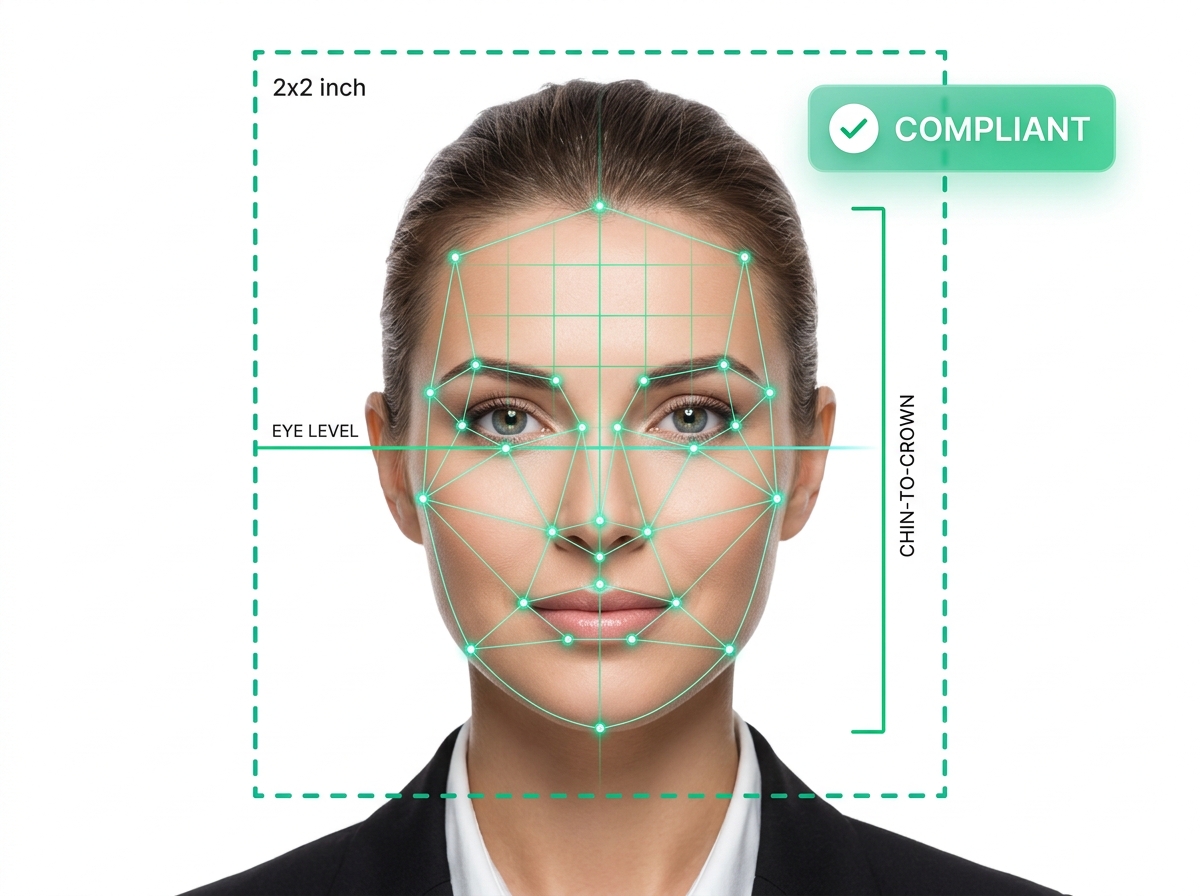
Official U.S. passport photographs must be exactly 2 x 2 inches (51 x 51 mm) in size, printed in color on glossy or matte photo-quality paper, taken within the last 6 months, set against a plain white or off-white background, with the head measuring between 1 inch and 1 3/8 inches (25–35 mm) from bottom of chin to top of head. Eyeglasses are strictly prohibited.
Figure 1: Official Department of State 2x2 photo framing guidelines with biometric eye-level alignment.
The Top 10 Passport Photo Rejection Mistakes
Mistake
Federal Standard
Why It Gets Rejected
1. Wearing Eyeglasses
Prohibited since 2016
Glare obscuring pupils; medical waiver required if glasses cannot be removed.
2. Shadows on Face/Wall
Even, flat lighting
Shadows behind ears or under chin confuse facial recognition scanners.
3. Off-Color Background
Pure white or off-white only
Cream, grey, patterned, or textured backdrops are rejected.
4. Incorrect Head Crop
1" to 1-3/8" (50% to 69% of height)
Face too close to camera or zoomed out too far.
5. Exaggerated Expression
Neutral facial expression
Open-mouth smiles, frowning, or squinting distort biometric points.
6. Uniforms or Camouflage
Normal street attire only
Military or service uniforms prohibited unless religious attire waiver.
7. Head Coverings / Hats
Full hairline and ears visible
Prohibited unless signed statement certifying religious or medical necessity.
8. Low Resolution / Blurry
Sharp focus, 300 DPI minimum
Pixelated self-prints on standard copy paper are immediately flagged.
9. Overexposure / Flash Glare
True skin tone representation
Washed-out skin or hot-spots from direct flash.
10. Damaged / Creased Prints
Pristine physical condition
Staples through facial features, paperclip indentations, or ink smudges.
How to Staple Your Photo to Form DS-82 or DS-11
Position the photo squarely inside the designated box on Page 1. Use four staples vertically in the corners as close to the outer edge as possible. Do NOT bend the photo, and never place a staple across your face, hair, or neck.
4. The Top 10 Technical Photo Rejection Triggers
Non-compliant photography is the single leading cause of passport application suspensions in the United States, responsible for over 250,000 delayed traveler files each year. The Department of State employs advanced biometric facial recognition algorithms during initial intake scanning. If an optical scan detects minor shadows, reflections, or sizing errors, the application is immediately halted and an administrative Form Letter 812 is mailed to the applicant.
Ensure your photo satisfies every one of the following 10 strict technical parameters:
Strict 2x2 Inch Dimensions: The photograph must measure exactly 2 x 2 inches (51 x 51 mm), with the subject's head positioned between 1 inch and 1 3/8 inches (25 to 35 mm) from the bottom of the chin to the top of the head.
Total Prohibition on Eyeglasses: Under federal consular rules adopted in 2016, eyeglasses are strictly forbidden in passport photographs—even prescription glasses or clear anti-glare lenses. The only narrow exception requires a signed medical statement from a licensed physician certifying that glasses cannot be removed due to recent eye surgery.
Pure White or Off-White Background: The background must be flat, untextured white or off-white. Backgrounds showing door frames, wallpaper patterns, shadows, or gray tones will trigger optical rejection.
Neutral Facial Expression (No Exaggerated Smiles): The applicant must look directly at the camera with both eyes open and a natural, relaxed, neutral facial expression or a gentle, unexaggerated natural smile with mouth closed.
Attire & Uniformity Restrictions: Commercial uniforms, military apparel, or camouflage clothing are prohibited. Normal everyday street clothing must be worn.
No Hats, Headbands, or Head Coverings: Hats or head coverings are prohibited unless a signed statement is submitted verifying religious observance (e.g., hijab, yarmulke) or medical necessity. Even with religious head coverings, the entire face from hairline to chin must remain completely visible without cast shadows.
No Headphones or Wireless Earbuds: AirPods, wireless earbuds, smart glasses, or oversized jewelry must be removed prior to photography.
Print Paper Quality: Photos must be printed on high-resolution photo-quality paper (either matte or glossy finish) without pixelation, digital compression artifacts, or inkjet banding lines.
No Digital Alteration or Filtering: Using selfie filters, AI smoothing tools, background erasure apps, or social media editing filters is strictly prohibited. Biometric algorithms detect unnatural lighting gradients instantly.
Recency Standard (Within 6 Months): The photo must reflect your current appearance and have been taken within the preceding 6 months. Submitting the same photo printed in a 5-year-old passport book will cause immediate file suspension.
Can I take my passport photo at home using a smartphone?
Yes, provided you strictly observe all federal lighting, background, and head measurement ratios. However, taking photos at professional pharmacies (Walgreens, CVS), shipping centers (UPS Store, FedEx Office), or post offices provides verified compliance guarantees.
How do I take compliant passport photos of an infant or baby?
Lay the infant on their back on a plain white sheet or place them in a car seat draped with a white blanket. Ensure no other person's hands or head appear in the frame, and that the child's eyes are open looking toward the camera lens.
7. Glare, Shadows, and Lighting Physics in Biometric Photos
Biometric facial verification software utilized by the Bureau of Consular Affairs evaluates passport photographs using micro-contrast edge detection algorithms. These algorithms map the precise coordinates of 80 distinct nodal points across the human face, including the distance between the eyes, the width of the nose bridge, and the contour of the jawline.
When photographs are captured under harsh directional lighting—such as direct camera flash or intense overhead fluorescent bulbs—harsh cast shadows often form beneath the chin, behind the ears, or around the eye sockets. These optical shadows obscure the facial landmark points, preventing algorithmic matching against the national consular facial recognition repository. To ensure compliance:
Use balanced, diffuse, dual-source lighting positioned at 45-degree angles toward the subject's face.
Ensure the white background is evenly illuminated with a separate backlight to eliminate wall shadows behind the head.
Do not apply digital retouching, smoothing filters, or artificial lighting enhancements; raw camera exposure without post-processing compression provides optimal biometric fidelity.